 08ff214ea6
* init

* more shifting

* Move @babel dependencies up to workspace root

* Begin updating dependent libraries to use sync'd webpack builds w/ watches

* Commit changes before a long weekend

* Split packages into platform and extensions

* Consolidate how/where we specify file/module type entrypoints

* Make it possible to pass in extensions as App props

* Resolve viewer's modules

* Target for UMD bundle

* Add Webpack Stylus loader

* Provide WebPack build options for microscopy, vtk, and ui

* Better entrypoint for extensions

* Push changes up to switch PCs

* Fix ESM symlink build for Viewers

* Shift docs to root

* Specify additional lerna config props

* Begin providing basic readme info

* Rename example extension folder

* Shift links to bottom of doc

* First attempt at a netlify deploy preview

* Attempt to fix deploy preview build

* push workspace enabled to initial command; remove second yarn install; use npx to call gitbook cli commands

* Try to use global gitbook-cli

* Export node_modules path

* More agressive with modifying PATH

* Follow deploy log output advice

* try again to set bin path

* Try swapping bash with a new shell

* Try bash -l instead of exec bash

* Annd let's try again

* and again

* We may have figured it out johnny, boy

* We need to pull cornerstone-wado-image-loader files from hoisted node_modules

* Attempt to fix ticks/escapes

* Change copy syntax; try running tests on viewers from root for circleci

* Lower version to match circleci image

* Try alternative jest-canvas-mock location and version file syntax

* Run version command instead of calling node directly

* Try alternative jest transform

* Set path and enable workspaces

* Add codecov flags

* Use cpx so our copying finishes?

* Get all platform unit tests to run

* Run and report individually and in parallel

* Try once relying on codecov yaml to split w/ flags

* Add projects to split by flags

* Generate separate reports

* Trigger codecov after everything has finished running; these may not support flags

* Use recommended flags from issue comments for codecov

* Fix typo

* Remove clear flag

* Shift back to calling codecov from root

* Generate example for codecov issue

* Try fixing paths

* Simplify

* Try using codecov orb

* Bump circleci version

* Upload core and viewer

* Use full string paths

* Remove individual codecov calls

* Fix dir

* Combine files before upload

* Escape anchors

* tryfix syntax

* Escape string literal

* Combine lines to reduce path

* long paths

* Use home alias

* Fix filename

* Try to see the contents of our cat'd file

* Also upload `core`

* Try running with aliased folder

* Fix path; split PR and Merge unit tests into separate jobs

* Set default threshold

* Fix typo

* Changing to scoped package names

* Adding note

* Catch more updates

* chore(release): publish %s [skip ci]

 - @ohif/extension-cornerstone@0.0.39-alpha.0
 - @ohif/extension-dicom-html@0.0.4-alpha.0
 - @ohif/extension-dicom-microscopy@0.0.9-alpha.0
 - @ohif/extension-dicom-pdf@0.0.8-alpha.0
 - @ohif/extension-vtk@0.1.4-alpha.0
 - @ohif/core@0.11.1-alpha.0
 - @ohif/i18n@0.2.3-alpha.0
 - @ohif/ui@0.2.18-alpha.0
 - @ohif/viewer@0.0.22-alpha.0

* Clean up primary readme

* Support for dev and dev:* commands

* Shift build command; satisfy default PWA build

* Remove old scripts

* Clean up UI to set webpack scripts

* Tidy up project links

* Clean duplicate code in UI project

* Update UI project's docs

* Clean up ui and i18n config

* Reduce duplicate code in `@ohif/core`

* Fix @ohif/ui versions

* bump @ohif/core versions

* Redux testkit dep

* Remove unused/duplicate config files for projects/packages

* ohif-core --> @ohif/core

* Safer publish command

* chore(release): publish %s [skip ci]

 - @ohif/extension-cornerstone@0.0.39-alpha.1
 - @ohif/extension-dicom-html@0.0.4-alpha.1
 - @ohif/extension-dicom-microscopy@0.0.9-alpha.1
 - @ohif/extension-dicom-pdf@0.0.8-alpha.1
 - @ohif/extension-vtk@0.1.4-alpha.1
 - @ohif/core@0.11.1-alpha.1
 - @ohif/i18n@0.2.3-alpha.1
 - @ohif/ui@0.2.18-alpha.1
 - @ohif/viewer@0.0.22-alpha.1

* test version bump

* Add global prettier config

* chore(release): publish %s [skip ci]

 - @ohif/viewer@0.0.22-alpha.2

* test lerna publish

* Update package.jsons

* Fix build scripts

* catch changes

* chore(release): publish %s [skip ci]

 - @ohif/extension-cornerstone@0.0.39-alpha.2
 - @ohif/extension-dicom-html@0.0.4-alpha.2
 - @ohif/extension-dicom-microscopy@0.0.9-alpha.2
 - @ohif/extension-dicom-pdf@0.0.8-alpha.2
 - @ohif/extension-vtk@0.1.4-alpha.2
 - @ohif/core@0.11.1-alpha.2
 - @ohif/i18n@0.2.3-alpha.2
 - @ohif/ui@0.2.18-alpha.2
 - @ohif/viewer@0.0.22-alpha.3

* fix eslint issues caused by eslint 6 and our react-app config

* Publish with canary tag

* chore(release): publish %s [skip ci]

 - @ohif/extension-cornerstone@0.0.39-alpha.3
 - @ohif/extension-dicom-html@0.0.4-alpha.3
 - @ohif/extension-dicom-microscopy@0.0.9-alpha.3
 - @ohif/extension-dicom-pdf@0.0.8-alpha.3
 - @ohif/extension-vtk@0.1.4-alpha.3
 - @ohif/core@0.11.1-alpha.3
 - @ohif/i18n@0.2.3-alpha.3
 - @ohif/ui@0.2.18-alpha.3
 - @ohif/viewer@0.0.22-alpha.4

* chore(release): publish %s [skip ci]

 - @ohif/extension-cornerstone@0.0.39-alpha.4
 - @ohif/extension-dicom-html@0.0.4-alpha.4
 - @ohif/extension-dicom-microscopy@0.0.9-alpha.4
 - @ohif/extension-dicom-pdf@0.0.8-alpha.4
 - @ohif/extension-vtk@0.1.4-alpha.4
 - @ohif/core@0.11.1-alpha.4
 - @ohif/i18n@0.2.3-alpha.4
 - @ohif/ui@0.2.18-alpha.4
 - @ohif/viewer@0.0.22-alpha.5

* Simplify build

* chore(release): publish %s [skip ci]

 - @ohif/extension-cornerstone@0.0.39-alpha.5
 - @ohif/extension-dicom-html@0.0.4-alpha.5
 - @ohif/extension-dicom-microscopy@0.0.9-alpha.5
 - @ohif/extension-dicom-pdf@0.0.8-alpha.5
 - @ohif/extension-vtk@0.1.4-alpha.5
 - @ohif/core@0.11.1-alpha.5
 - @ohif/i18n@0.2.3-alpha.5
 - @ohif/ui@0.2.18-alpha.5
 - @ohif/viewer@0.0.22-alpha.6

* chore(release): publish %s [skip ci]

 - @ohif/extension-cornerstone@0.0.39-alpha.6
 - @ohif/extension-dicom-html@0.0.4-alpha.6
 - @ohif/extension-dicom-microscopy@0.0.9-alpha.6
 - @ohif/extension-dicom-pdf@0.0.8-alpha.6
 - @ohif/extension-vtk@0.1.4-alpha.6
 - @ohif/core@0.11.1-alpha.6
 - @ohif/i18n@0.2.3-alpha.6
 - @ohif/ui@0.2.18-alpha.6
 - @ohif/viewer@0.0.22-alpha.7

* Split version and publish

* chore(release): publish %s [skip ci]

 - @ohif/extension-cornerstone@0.0.39-alpha.7
 - @ohif/extension-dicom-html@0.0.4-alpha.7
 - @ohif/extension-dicom-microscopy@0.0.9-alpha.7
 - @ohif/extension-dicom-pdf@0.0.8-alpha.7
 - @ohif/extension-vtk@0.1.4-alpha.7
 - @ohif/core@0.11.1-alpha.7
 - @ohif/i18n@0.2.3-alpha.7
 - @ohif/ui@0.2.18-alpha.7
 - @ohif/viewer@0.0.22-alpha.8

* Try simplify netlify build

* react-viewerbase --> @ohif/ui

* add test for stylus loader

* Try new way to specify publish path

* Use an output folder that won't be ignored

* Try move command

* fiddle with paths

* Dig for some information

* Make sure we're in root for our commands

* Remove discovery

* Setup script-tag example

* Fix typo

* Move config folder

* Update cornerstone extension to use shared/root webpack configs

* capture changes

* Update extension webpack configs

* Don't check in docz output

* Fix babel runtime resolution issue

* Simplify ui build steps

* Push in progress

* Shift directories

* Get viewer dev path to work

* Fix viewer commonjs build

* Fix build pwa config for viewers

* Make sure our package specific command can be called from root

* Update notes

* Fix imports and misc. merge notes

* Bump wado-image-loader version

* Switch up commands to remove webworkers copy

* Fix CI config

* Fix more broken package references

* Add react-dropzone

* Persist so e2e test can use

* Fix lockfile

* Use cypress orb to simplify CI

* Fix config

* Try again

* Install yarn latest for orb

* Install yarn a different way

* Wait on correct port

* Run tests in viewer project

* Fix cypress config

* Make Cypress happier - use default location

* Simplify e2e testing

* Capture UI changes since fork

* Catch core up

* Grab latest deps after merge

* Fix broken import

* Make sure cornerstone-wado-image-loader resolves to 3+

* Note regarding orbs

* Fix refresh on 404 routes

* Fix odd error for cornerstone-wado-image-loader

* Different target for UMD

* Simplify dev script

* Try to get fancy with netlify output

* Let's do it again

* Try to fix measurementTools issue

* See if we can get our lerna magic to work on merge to monorepo branch
7.5 KiB
Extensions
Extensions add new functionality to the viewer by registering one or more modules. They go one step further than configuration in that they allow us to inject custom React components, so long as they adhere to the module's interface. This can be something as simple as adding a new button to the toolbar, or as complex as a new viewport capable of rendering volumes in 3D.
Overview
At a glance, an extension is a javascript object that has an id property, and
one or more "module" methods. You can find an abbreviated extension below, or
[view the source][example-ext-src] of our example extension.
export default {
    /**
     * Only required property. Should be a unique value across all extensions.
     */
    id: 'example-extension',

    /**
     * Registers one or more named commands scoped to a context. Commands are
     * the primary means for...
     */
    getCommandsModule() {
        return {
            defaultContext: 'VIEWER'
            actions: { ... },
            definitions: { ... }
        }
    },

    /**
     * Allows you to provide toolbar definitions that will be merged with any
     * existing application toolbar configuration. Used to determine which
     * buttons should be visible when, their order, what happens when they're
     * clicked, etc.
     */
    getToolbarModule() {
        return {
            definitions: [ ... ],
            defaultContext: 'ACTIVE_VIEWPORT::CORNERSTONE'
        }
    }

    /**
     * Not yet implemented
     */
    getPanelModule: () => null,

    /**
     * Registers a ReactComponent that should be used to render data in a
     * Viewport. The first registered viewport is our "default viewport". If
     * more than one viewport is registered, we use `SopClassHandlers` to
     * determine which viewport should be used.
    */
    getViewportModule: () => reactViewportComponent,

    /** Provides a whitelist of SOPClassUIDs the viewport is capable of rendering.
     *  Can modify default behavior for methods like `getDisplaySetFromSeries` */
    getSopClassHandler: () => {
        id: 'some-other-unique-id',
        sopClassUids: [ ... ],
        getDisplaySetFromSeries: (series, study, dicomWebClient, authorizationHeaders) => { ... }
    },
}
Modules
There are a few different module types. Each module type allows us to extend the
viewer in a different way, and provides a consistent API for us to do so. You
can find a full list of the different types of modules
[in ohif-core][module-types]. Information on each type of module, it's API,
and how we determine when/where it should be used is included below.
NOTE: Modifying the extensions/modules registered to the OHIF Viewer currently requires us to import and pass extensions to the ExtensionManager in
src/App.js, then rebuild the application. Long-term, we intend to make it possible to accomplish this without a build step.
Commands
The Commands Module allows us to register one or more commands scoped to specific contexts. Commands can be run by [hotkeys][#], [toolbar buttons][#], and any registered custom react component (like a [viewport][#] or [panel][#]). Here is a simple example commands module:
{
    getCommandsModule() {
        return {
            actions: {
                speak: ({ viewports, words }) => {
                    console.log(viewports, words);
                },
            },
            definitions: {
                rotateViewportCW: {
                    commandFn: actions.rotateViewport,
                    storeContexts: ['viewports'],
                    options: { rotation: 90 }
                },
                rotateViewportCCW: {
                    commandFn: actions.rotateViewport,
                    storeContexts: ['viewports'],
                    options: { rotation: -90 },
                    context: 'ACTIVE_VIEWER::CORNERSTONE'
                },
            },
            defaultContext: 'VIEWER'
        }
    }
}
Viewport
An extension can register a Viewport Module by providing a getViewportModule()
method that returns a React Component. The React component will receive the
following props:
children: PropTypes.arrayOf(PropTypes.element)
studies: PropTypes.object,
displaySet: PropTypes.object,
viewportData: PropTypes.object, // { studies, displaySet }
viewportIndex: PropTypes.number,
children: PropTypes.node,
customProps: PropTypes.object
Viewport components are managed by the LayoutManager. Which Viewport component
is used depends on:
- The Layout Configuration
- Registered SopClassHandlers
- The SopClassUID for visible/selected datasets
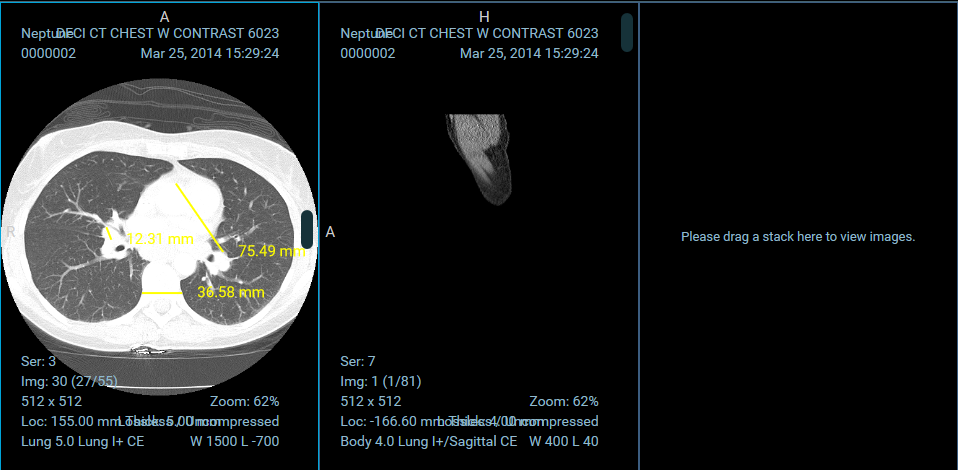
For a complete example implementation, check out the OHIFCornerstoneViewport.
Toolbar
An extension can register a Toolbar Module by providing a getToolbarModule()
method that returns a React Component. The component does not receive any props.
If you want to modify or react to state, you will need to connect to the redux
store.
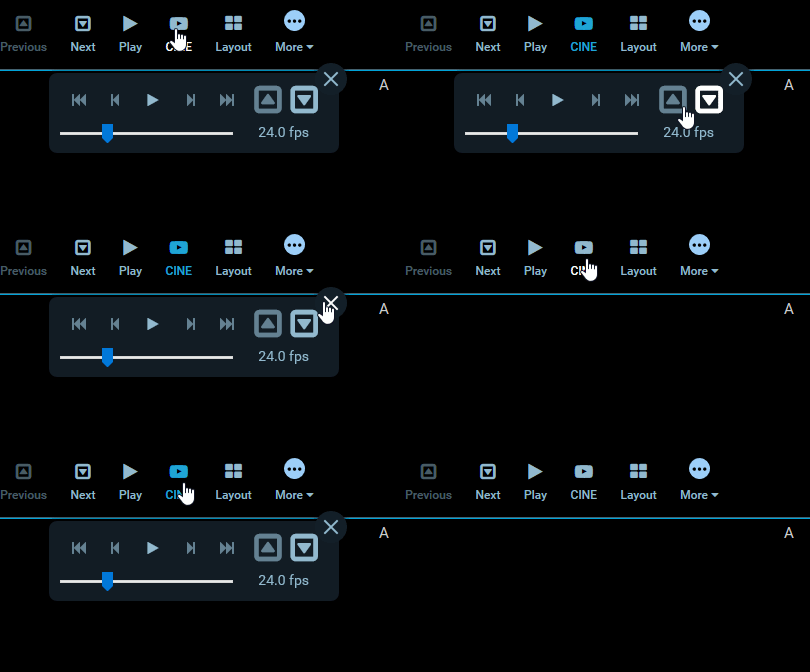
Toolbar components are rendered in the ToolbarRow component.
For a complete example implementation, check out the OHIFCornerstoneViewport's Toolbar Module.
SopClassHandler
...
Panel
The panel module is not yet in use.
Hotkeys
...
Registering Extensions
Extensions are registered for the application at startup. The
ExtensionManager, exposed by ohif-core, registers a list of extensions with
our application's store. Each module provided by the extension becomes available
via state.plugins.availablePlugins, and consists of three parts: id, type
(PLUGIN_TYPE),
and the return value of the module method.
In a future version, we will likely expose a way to provide the extensions you would like included at startup.
app.js
import { createStore, combineReducers } from "redux";
import OHIF from "@ohif/core";
import OHIFCornerstoneExtension from "ohif-cornerstone-extension";

const combined = combineReducers(OHIF.redux.reducers);
const store = createStore(combined);
const extensions = [new OHIFCornerstoneExtension()];

// Dispatches the `addPlugin` action to the store
// Adding extension modules to `state.plugins.availablePlugins`
ExtensionManager.registerExtensions(store, extensions);
OHIF Maintained Extensions
A small number of powerful extensions for popular use cases are maintained by
OHIF. They're co-located in the
OHIF/Viewers repository, in the
top level extensions/
directory.
{% include "./_maintained-extensions-table.md" %}
[example-ext-src]: https://github.com/OHIF/Viewers/blob/master/extensions/_ohif-example-extension/src/index.js)
[module-types]: 43c08a29ef/src/plugins.js (L1-L6)