 bd1c38c00c
* feat: cs3d working stack viewport and tools (#19)

* Squashed everything

* fix weird react issue

* fix eslint / prettier stuff

* thumbnails work now with cpu rendering

* feat: use new loadImageToCanvas in cs3d

* make jump to measurement work

* fix active thumbnail

* fix measurement delete

* fix window level presets

* remove segmentation and sync groups for now

* fix the dicom pdf and dicom video

* fix cornerstone window assignment for cypress

* apply review comments

Co-authored-by: Erik <erik.sweed@gmail.com>

* feat: cs3d tools and toolGroups (#20)

* add more tools to work with cs3d mode

* fix hotkeys

* add stack manager usage for stach viewports

* add image scrollbar

* wip viewport overlay

* fix toAnnotation schema for tools

* fix the unnecessary size change that triggered resize

* hanging protocol improvement to allow unmatched errors

* study description matching for hanging protocol

* fix the displaysetOptions to work

* fix handle the active tool when a new viewport is added

* fix separate toolGroups for mode

* apply review comments

* apply review comments

* yarn lock

* feat: overlay component (#21)

* fix default displayset options

* add viewport overlay

* apply review comments

* feat: loading and orientation indicators (#22)

* add loading indicator

* add orientation marker initial work

* apply review comments

* fix: orientation markers (#23)

* finished the orientation markers

* fix various broken cypress tests

* apply review comments

* update yarn lock

* feat: re-working measurement tracking mode with cornerstone3d (#2805)

* feat: cs3d working stack viewport and tools (#19)

* Squashed everything

* fix weird react issue

* fix eslint / prettier stuff

* thumbnails work now with cpu rendering

* feat: use new loadImageToCanvas in cs3d

* make jump to measurement work

* fix active thumbnail

* fix measurement delete

* fix window level presets

* remove segmentation and sync groups for now

* fix the dicom pdf and dicom video

* fix cornerstone window assignment for cypress

* apply review comments

Co-authored-by: Erik <erik.sweed@gmail.com>

* feat: Add Measurement tracking mode with cs3D (#2789)

* feat: first render for cornerstone3d tracked viewport

* make tool active work

* wip for SR extension

* renamed dicom sr to cornerstone dicom sr

* remove cornerstone from dicom pdf and video

* move dicom sr logic to sr extension

* feat: Add hydration for the length tool

* fix SR display tool for length using cs3d

* fix default config

* fix: various bugs with sr viewport and tracking

* fix promptying to continue tracking for when SR is created

* feat: add keep trackign of unique identifiers

* fix hydration for same imageIds

* feat: Add SR toolGroup creation on modeEnter

* feat: remove the need for separate mapper for SR hydration

* add SR display for ellipse

* handle hydration of elliptical ROI tool

* remove cornerstone extension

* add arrow mapping

* feat: Add ArrowAnnotate SR display and hydration

* apply review comments

* apply review comments

* move viewport labels to the viewportData

* apply review comments

* fix: integration cypress tests with cornerstone3D and add CINE tool (#2795)

* fix: integration cypress tests with cornerstone3D

* revert to addOrUpdate as it makes more sense

* fix local drag and drop

* fix tests

* move dicomLoaderService to cornerstone extension

* fix various import bugs

* fix bug for local PT series

* fix various unit tests

* bump cs3d versions

* add angle and magnify tool

* bump dependencies to avoid broken peerDeps

* feat: add initial work for capture using cs3d

* feat: show annotations on the image capture

* feat: add svg layer export

* feat: Add CINE Tool

* feat: remove unnecessary viewport rendering for cine state changes

Co-authored-by: Erik Ziegler <erik.sweed@gmail.com>

* docs: modify and improve documentation (#2800)

* cleanup docs versionings

* feat: Add all version explanations

* version docs for 3.0

* wip for changing docs

* wip for updated docs

* add utility module documentation

* fix demo with nohoisting of history

* add slides and video to resources

* apply review comments

* fix: drag and drop SR into SR viewport (#2803)

* update yarn lock

Co-authored-by: Erik <erik.sweed@gmail.com>

* update pathnames to match v3-stable

* update the e2e pathname

* fix: various bugs with regard to tracking workflow (#2811)

* fix: various issues with measurement panel

* fix: update default tool style for annotations

* fix: annotatoin label getting removed

* feat: Add backward compatibility for SR hydration with legacy cornerstone

* fix: cursors and ellipse ROI max style

* fix: ArrowAnnotate SRDisplay

* apply review comments

* bump package versions

* fix: bugin rehydration of SR

* fix: e2e tests

* fix active viewport thickness and arrowTool ui

* add readme for measurement tracking

* use uploaded image for readme

* add back images

* try to fix e2e test

* fix: window level presets hotkeys

* Update README.md

* update yarn lock

* feat: volume api and TMTV mode (#2817)

* feat: volumeAPI and TMTV mode

* feat: use cs3d cache service to obtain viewportData

* wip for volume api

* wip: fusion viewport

* feat: add blend mode option

* wip for image scrollbar

* fix drag and drop thumbnail

* wip for image scrollbar for voluems

* fix: element mismatch bug for scroll

* feat: Add image scrollbar to volumes

* feat: add syncGroups to volume api

* feat: add tmtv mode initial setup

* feat: add initial image options for the stack viewports

* feat: Add custom load strategy for volume viewports via HP

* apply review comments

fix: Jump presets cs3d (#2812)

* feat: Add JumpPreset to OHIF for Cornerstone3D

* fix: accessing viewport service from servicesManager

feat: volume API and TMTV mode (#2814)

* fix: do not display overlays on mip viewports

* feat: add optional disableCommands for toggle buttons

* fix: toggleCrossharis

* feat: config the crosshairs

* feat: add PetSUV Panel for changing metadata

* feat: initial work for the rectangleROIThreshold panel

* wip: measurement service

* roi threshold working

* feat: Add displayText to segmentations

* feat: add remove segmentation

* feat: add csv export

* feat: add RT export for annotations in tmtv mode

* fix: fusion to use pt in tmtv mode and measuremet mappings

* fix: various bugs

* apply review comments

* apply review comments

* feat: add fusion color maps

* add readme to tmtv mode

* Update README.md

* fix: try to fix build

* fix unit tests

* Update README.md

* feat: add about to the panel

* fix: changing strategy in roi panel

* apply review comments

* update package versions

* wip for stackPrefetch

* fix: cornerstone3d hydration and renaming (#2818)

* update readme

* renamed cornerstone extension

* wip for renaming cornerstone3D variables

* wip for renaming cornerstone3D variables

* wip for fixing bugs for SR viewport

* fix: jumpToMeasurement and initial label after hydration

* fix: fileName capitalization

* feat: use the new prefetch stack in the cs3d (#2820)

* feat: use the new prefetch stack in the cs3d

* use viewport scroll api for stack viewport

* fix cine stop when scrollbar changes

* feat: use new prefetch events

* fix loading state to not show repeatedly

* fix: various bugs for tmtv mode thresholding and new icons (#2823)

* feat: make tmtv mode available in worklist

* feat: add new icons for tmtv mode

* feat: add fusion color icon

* fix: parallel scale calculation

* fix: bump Cornerstone to get large image support working

* fix: Fix issues with CPU viewport flipping, including config files

* fix: bump cornerstone to fix magnify tool

* fix: Bump Cornerstone version to fix resetCamera issue in StackViewport

* ci: Add _headers file to enable CORS headers for Netlify Drag/Drop deploys

* fix: WADO-URI was not working. PET Metadata was coming from the wrong place. Fixed some minor React errors

* feat(OHIF):Allow modes and extensions to be added after commpile time. (#2838)

Also works with the compile time add that the existing cli uses, so that both build types work.
Eric and I agreed this doesn't change existing functionality, but is almost entirely build issues/fixes.

* bump: dependency versions to fix hydration bugs (#2848)

* bump: dcmjs version to fix hydration bugs

* try to fix tests

* bump dependency versions

Co-authored-by: Alireza <ar.sedghi@gmail.com>
Co-authored-by: Bill Wallace <wayfarer3130@gmail.com>
9.8 KiB
| sidebar_position |
|---|
| 4 |
Nginx + Image Archive
DISCLAIMER! We make no claims or guarantees of this approach's security. If in doubt, enlist the help of an expert and conduct proper audits.
At a certain point, you may want others to have access to your instance of the OHIF Viewer and its medical imaging data. This post covers one of many potential setups that accomplish that. Please note, noticeably absent is user account control.
Do not use this recipe to host sensitive medical data on the open web. Depending on your company's policies, this may be an appropriate setup on an internal network when protected with a server's basic authentication. For a more robust setup, check out our user account control recipe that builds on the lessons learned here.
Overview
Our two biggest hurdles when hosting our image archive and web client are:
- Risks related to exposing our PACS to the network
- Cross-Origin Resource Sharing (CORS) requests
Handling Web Requests
We mitigate our first issue by allowing Nginx to handle incoming web requests. Nginx is open source software for web serving, reverse proxying, caching, and more. It's designed for maximum performance and stability -- allowing us to more reliably serve content than Orthanc's built-in server can.
More specifically, we accomplish this by using a
reverse proxy to retrieve
resources from our image archive (Orthanc), and when accessing its web admin.
A reverse proxy is a type of proxy server that retrieves resources on behalf of a client from one or more servers. These resources are then returned to the client, appearing as if they originated from the proxy server itself.
CORS Issues
Cross-Origin Resource Sharing (CORS) is a mechanism that uses HTTP headers to
tell a browser which web applications have permission to access selected
resources from a server at a different origin (domain, protocol, port). IE. By
default, a Web App located at http://my-website.com can't access resources
hosted at http://not-my-website.com
We can solve this one of two ways:
- Have our Image Archive located at the same domain as our Web App
- Add appropriate
Access-Control-Allow-*HTTP headers
This solution uses the first approach.
You can read more about CORS in this Medium article: Understanding CORS
Diagram
This setup allows us to create a setup similar to the one pictured below:
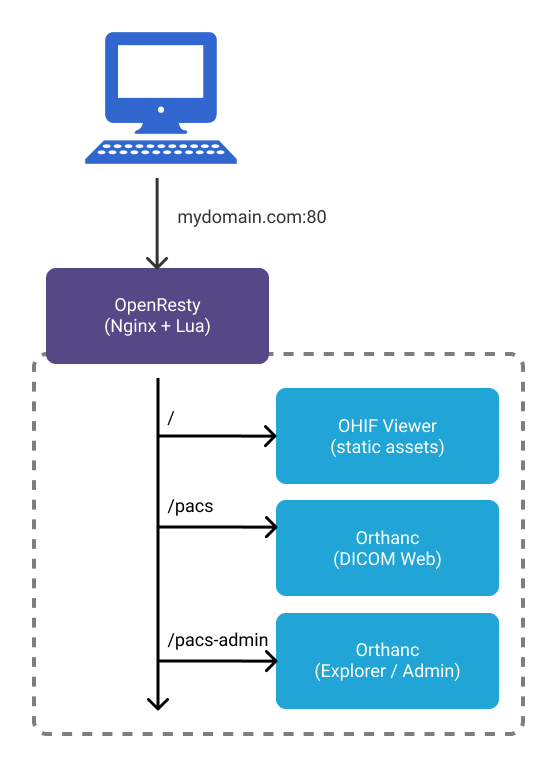
- All web requests are routed through
nginxon ourOpenRestyimage /pacsis a reverse proxy fororthanc'sDICOM Webendpoints/pacs-adminis a reverse proxy fororthanc's Web Admin- All static resources for OHIF Viewer are served up by
nginxwhen a matching route for that resource is requested
Getting Started
Requirements
- Docker
Not sure if you have docker installed already? Try running docker --version
in command prompt or terminal
Setup
- Navigate to
viewerfolder insideplatform - then:
cd .recipes/OpenResty-Orthanc - run:
docker-compose up --build - Navigate to
127.0.0.1for the viewer - Navigate to
127.0.0.1/pacs-adminfor uploading studies
You can see the overview of the mentioned steps:
Troubleshooting
Exit code 137
This means Docker ran out of memory. Open Docker Desktop, go to the advanced
tab, and increase the amount of Memory available.
Cannot create container for service X
Use this one with caution: docker system prune
X is already running
Stop running all containers:
- Win:
docker ps -a -q | ForEach { docker stop $_ } - Linux:
docker stop $(docker ps -a -q)
Traceback (most recent call last): File "urllib3/connectionpool.py", line 670, in urlopen ....
Are you sure your docker is running? see explanation here
Configuration
After verifying that everything runs with default configuration values, you will likely want to update:
- The domain:
http://127.0.0.1
OHIF Viewer
The OHIF Viewer's configuration is imported from a static .js file. The
configuration we use is set to a specific file when we build the viewer, and
determined by the env variable: APP_CONFIG. You can see where we set its value
in the dockerfile for this solution:
ENV APP_CONFIG=config/docker_openresty-orthanc.js
You can find the configuration we're using here:
/public/config/docker_openresty-orthanc.js
To rebuild the webapp image created by our dockerfile after updating the
Viewer's configuration, you can run:
docker-compose buildORdocker-compose up --build
Other
All other files are found in: /docker/OpenResty-Orthanc/
| Service | Configuration | Docs |
|---|---|---|
| OHIF Viewer | dockerfile | You're reading them now! |
| OpenResty (Nginx) | /nginx.conf |
lua-resty-openidc |
| Orthanc | /orthanc.json |
Here |
Next Steps
Deploying to Production
While these configuration and docker-compose files model an environment suitable for production, they are not easy to deploy "as is". You can either:
- Manually recreate this environment and deploy built application files OR
- Deploy to a cloud kubernetes provider like Digital Ocean OR
- Find and follow your preferred provider's guide on setting up swarms and stacks
Adding SSL
Adding SSL registration and renewal for your domain with Let's Encrypt that terminates at Nginx is an incredibly important step toward securing your data. Here are some resources, specific to this setup, that may be helpful:
While we terminate SSL at Nginx, it may be worth using self-signed certificates for communication between services.
Use PostgresSQL w/ Orthanc
Orthanc can handle a large amount of data and requests, but if you find that
requests start to slow as you add more and more studies, you may want to
configure your Orthanc instance to use PostgresSQL. Instructions on how to do
that can be found in the
Orthanc Server Book, under
"PostgreSQL and Orthanc inside Docker"
Improving This Guide
Here are some improvements this guide would benefit from, and that we would be more than happy to accept Pull Requests for:
- SSL Support
- Complete configuration with
.envfile (or something similar) - Any security issues
- One-click deploy to a cloud provider
Resources
Misc. Helpful Commands
Check if nginx.conf is valid:
docker run --rm -t -a stdout --name my-openresty -v $PWD/config/:/usr/local/openresty/nginx/conf/:ro openresty/openresty:alpine-fat openresty -c /usr/local/openresty/nginx/conf/nginx.conf -t
Interact w/ running container:
docker exec -it CONTAINER_NAME bash
List running containers:
docker ps
Referenced Articles
For more documentation on the software we've chosen to use, you may find the following resources helpful:
For a different take on this setup, check out the repositories our community members put together: